Professional Paystub Reports in Seconds
Snap, upload, or enter manually — AI pre-fills your report instantly. Preview, edit, and download your polished Paystub.
Drop your PDF or image here
PNG · JPG · PDF — Max 10 MB
Your data stays private
See How Your Paystub Transforms
From messy scan to professional report in seconds
❌ BEFORE
══════════════════════════════════════
ACME CORPORATION - PAYROLL
EMPLOYEESSNPAY PERIOD
JONATHAN R. DOE ***-**-6789 03/01/24 - 03/15/24
════════════════════════════════════
PAY DATECHECK NO.NET PAY
03/15/24 060432 $644.41
YEAR TO DATE ════════════════════════
EARNINGS TAXES WITHHELD OTHER DEDUCTIONS
Desc Hrs Amt Tax Curr YTD Desc Amt
REGULAR 80 800.00 FED TAX 102.40 307.20 401K 35.00
OVERTIME 5 75.00 SOC SEC 54.25 130.20
MEDICARE 12.69 30.45
STATE 26.25 63.00
CURRENT 875.00 YTD 2,100.00 GROSS PAY
😵 Hard to read • Messy • Unprofessional
✅ AFTER
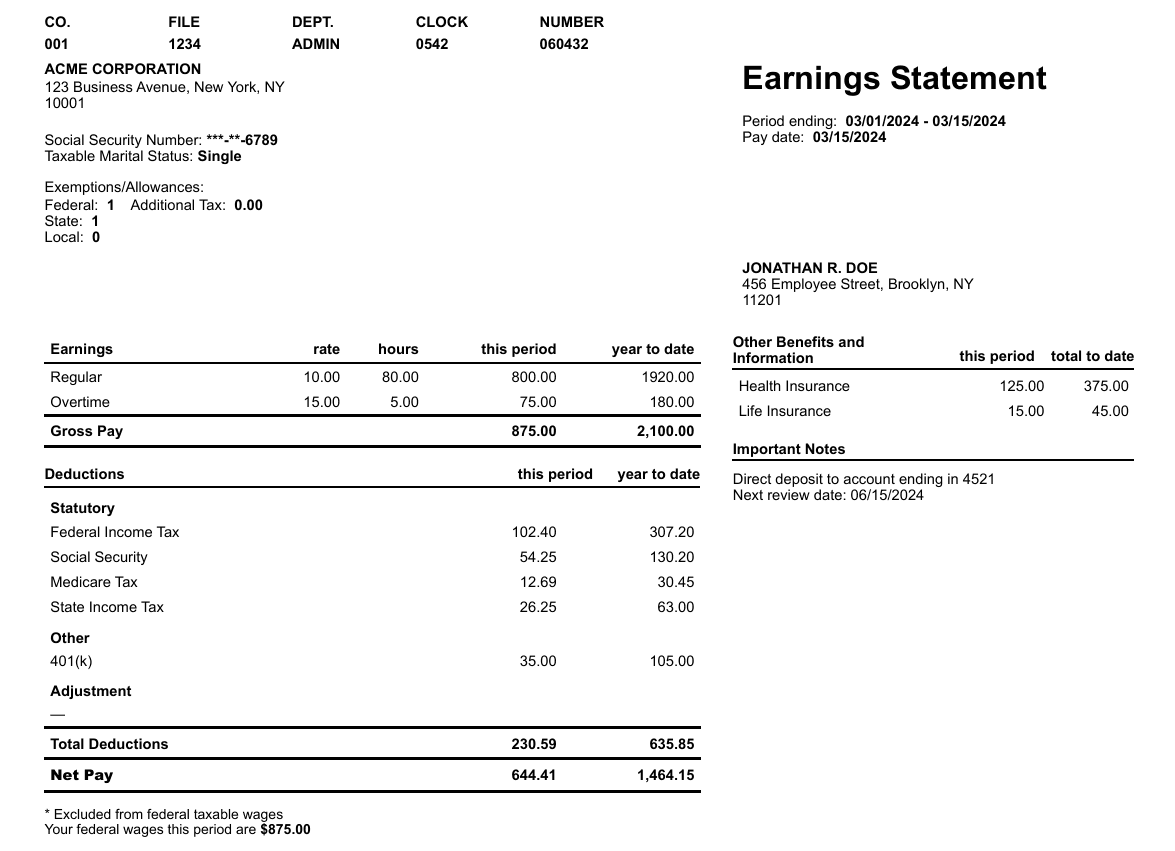
✨ Clean • Professional • Ready to submit
How it works
📤
Upload
Snap • Upload • Manual
✨
AI Pre-fills
Preview • Edit
📄
Download
Polished Paystub
Frequently Asked Questions
Everything you need to know about CleanPaystubs
What is CleanPaystubs and how does it work?▼
CleanPaystubs is an AI-powered tool that transforms your existing paystubs into clean, professional reports. Simply snap a photo, upload an image/PDF, or enter details manually. Our AI instantly pre-fills all the key information — employer, employee, earnings, deductions, taxes, and net pay. You can preview and edit anything before downloading your polished paystub report. It's the fastest way to create professional pay documents.
What can I use my paystub report for?▼
Your CleanPaystubs paystub report helps you present your existing pay information clearly for situations like: apartment rentals and lease applications, car loans and auto financing, mortgage pre-approval, personal loan applications, credit card applications, visa and immigration documentation, tax preparation, and any situation where you need to present your pay details professionally.
Is my first paystub report really free?▼
Yes! Your first paystub report is completely free — no credit card required. Simply sign up with your email, upload or enter your paystub details, and download your professional report. After your free report, you can purchase additional credits at affordable prices.
What is a paystub and what information does it contain?▼
A paystub (also called a pay stub, paycheck stub, or wage statement) is a document that shows the details of an employee's pay for a specific pay period. It typically includes: employer name and address, employee name and address, pay period dates, gross pay (total earnings before deductions), itemized deductions (federal tax, state tax, Social Security, Medicare), net pay (take-home amount), and year-to-date (YTD) totals. CleanPaystubs extracts and organizes all this information into a clean, easy-to-read format.
What's the difference between gross pay and net pay?▼
Gross pay is your total earnings before any deductions — this includes your regular wages, overtime, bonuses, and any other compensation. Net pay (also called "take-home pay") is what you actually receive after all deductions are subtracted, including federal and state taxes, Social Security, Medicare, health insurance premiums, and retirement contributions. CleanPaystubs clearly displays both amounts on your report.
Why do landlords ask for pay stubs?▼
Landlords request pay stubs to understand your income level and payment consistency. They typically look at employer information, pay dates, and earnings amounts. Most landlords ask for 2-3 months of recent pay stubs and prefer your monthly income to be at least 3x the monthly rent. A clean, professional, and easy-to-read paystub document makes the review process smoother. CleanPaystubs creates well-formatted reports that display all the information property managers typically look for.
Can I edit my paystub before downloading?▼
Absolutely! After our AI pre-fills your report, you get a full preview where you can review and edit every field — employer details, employee information, earnings, deductions, taxes, and totals. This ensures your final document is 100% accurate before you download. You have complete control over the final output.
What file formats can I upload?▼
CleanPaystubs accepts multiple file formats: JPEG/JPG images, PNG images, and PDF documents. You can snap a photo of your paper paystub with your phone, upload a screenshot, or submit a PDF you received from your employer. Our AI processes all formats and extracts the relevant information automatically. You can also use our Manual Entry option to type in the details yourself.
Is my data safe and private?▼
Yes, your privacy is our priority. Your uploaded documents are processed securely and are not stored permanently on our servers. We use encryption to protect your data during transmission. Your personal and financial information is never shared with third parties. Once you download your report, you have full control over your document.
What is Year-to-Date (YTD) on a paystub?▼
Year-to-Date (YTD) represents the cumulative total of your earnings, taxes, and deductions from January 1st of the current year through the current pay period. YTD figures help you track your total annual income, monitor tax withholdings, and prepare for tax season. CleanPaystubs includes YTD totals in your report when available from your original paystub.
How is CleanPaystubs different from other paystub tools?▼
Unlike tools that require you to manually enter all information from scratch, CleanPaystubs uses AI to automatically extract and pre-fill data from your existing paystub. Simply upload a photo or PDF of your current paystub, and our AI does the heavy lifting. This saves time, reduces errors, and gives you a professionally formatted report in seconds. You still get full editing control before downloading.
Do I need to create an account?▼
You only need to enter your email to get started. This allows us to give you your free first report and track your credits for future reports. No lengthy sign-up process, no password required — just enter your email and start creating your professional paystub report immediately.